Introduction
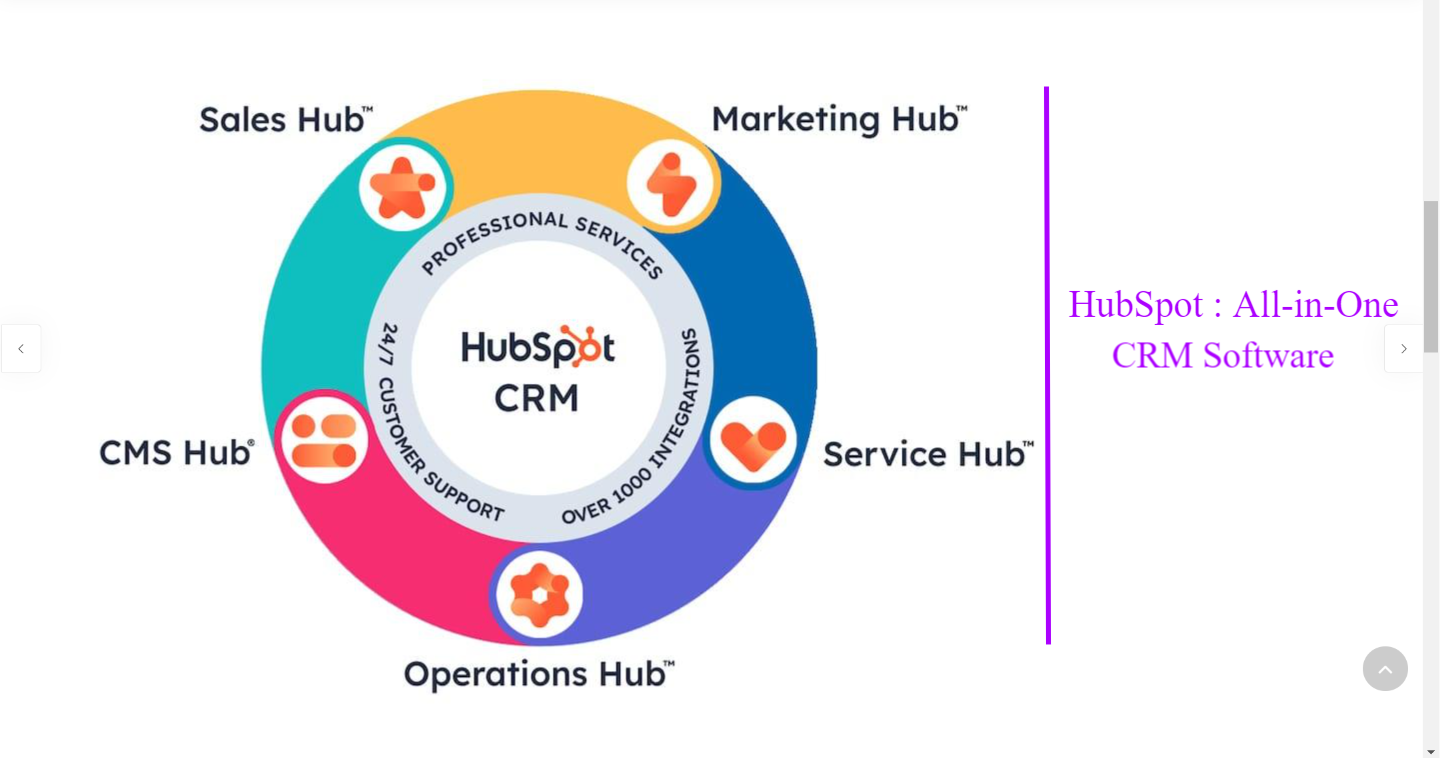
In today’s digital-first business landscape, customer relationships and data-driven marketing form the backbone of organizational success. As companies scale, they often face the challenge of managing customer interactions, sales pipelines, and marketing efforts across multiple disconnected tools. HubSpot seeks to solve this problem by providing an all-in-one ecosystem that combines customer relationship management (CRM), marketing automation, sales enablement, customer service, and content management into one cohesive platform.
Founded in 2006, HubSpot has grown into one of the most recognized names in inbound marketing. Its goal has always been to help businesses attract, engage, and delight customers by aligning marketing, sales, and service teams. But how well does HubSpot perform in 2025, amid growing competition from tools like Salesforce, Zoho, and Pipedrive? This review explores HubSpot’s key features, pricing structure, advantages, limitations, and overall value to businesses of varying sizes.
1. HubSpot CRM: The Core of the Platform
At the heart of the HubSpot ecosystem lies its CRM (Customer Relationship Management) system — and perhaps its biggest selling point is that it’s free to get started.
Ease of Use
HubSpot’s CRM is well-regarded for its intuitive interface. Unlike traditional CRMs that often require lengthy onboarding, HubSpot’s dashboard is clean and beginner-friendly. Contacts, companies, and deals are organized logically, and the system provides a clear view of the entire sales pipeline at a glance.
Contact Management
Users can store unlimited contacts in the free version, track interactions automatically, and integrate communications through email, phone calls, and live chat. Every engagement with a lead or customer is logged automatically, giving teams a complete history of interactions — crucial for maintaining personalized customer relationships.
Pipeline Management
Sales teams benefit from customizable pipelines, allowing them to track deals by stage and assign tasks. The drag-and-drop functionality simplifies movement through the funnel, while automation features send reminders or trigger emails based on deal progress.
Integrations and Reporting
HubSpot’s CRM integrates seamlessly with over 1,000 third-party applications, including Gmail, Outlook, Slack, and Zoom. The reporting dashboard provides real-time insights into deal value, activity performance, and revenue forecasts.
Verdict:
HubSpot’s CRM offers a perfect balance of simplicity and depth. It’s particularly beneficial for small to mid-sized teams that want a unified system without the complexity or cost of enterprise-grade CRMs.
Hubsopt CRM
2. Marketing Hub: Driving Inbound Growth
The Marketing Hub is the component that established HubSpot’s reputation as the leader in inbound marketing. It equips businesses with tools to attract visitors, convert leads, and nurture customers through automated campaigns.
Key Features
-
Email Marketing: HubSpot’s drag-and-drop email builder makes creating professional, personalized emails straightforward. Dynamic content ensures that each recipient gets messages tailored to their interests and behavior.
-
Automation Workflows: Marketers can automate repetitive tasks — from sending follow-up emails to scoring leads — based on user behavior triggers.
-
Landing Pages and Forms: HubSpot simplifies lead capture with built-in templates and A/B testing features.
-
SEO and Content Tools: The platform includes keyword tracking, topic clustering, and SEO recommendations to optimize organic performance.
-
Social Media Management: Users can plan, publish, and analyze social campaigns from a single dashboard.
Analytics and Performance Tracking
HubSpot’s reporting tools go beyond vanity metrics. You can attribute ROI to specific campaigns and track which channels contribute most to conversions. This makes budget allocation more strategic and data-driven.
Verdict:
The Marketing Hub is one of the most comprehensive inbound marketing suites available. It’s designed for teams that prioritize content-driven growth and value advanced automation capabilities. However, the pricing for higher-tier features may be steep for startups.
3. Sales Hub: Streamlining the Sales Process
The Sales Hub enhances productivity and alignment between marketing and sales teams. It offers tools for tracking deals, managing pipelines, and automating outreach efforts.
Key Features
-
Email Tracking and Templates: Receive real-time notifications when prospects open emails or click links. Sales reps can use customizable templates to standardize communications.
-
Sequences and Automation: Create automated email sequences that nurture leads over time without manual follow-up.
-
Meeting Scheduler: The built-in meeting tool eliminates the back-and-forth of scheduling by syncing with calendars.
-
Quotes and eSignatures: Users can generate professional quotes and close deals faster through electronic signature integration.
Performance and Analytics
Sales managers can view dashboards showing deal progress, conversion rates, and activity levels. HubSpot’s AI-driven insights also highlight which leads are most likely to convert based on past interactions.
Verdict:
The Sales Hub is a powerful tool for improving team efficiency and maintaining consistency across outreach. It’s especially valuable for B2B organizations looking to shorten sales cycles and gain data-backed insights.
Sales Hub
4. Service Hub: Enhancing Customer Support
In today’s customer-centric marketplace, retaining clients is as important as acquiring new ones. The Service Hub helps businesses provide exceptional support through a unified customer service system.
Key Features
-
Help Desk and Ticketing: Manage and prioritize support tickets, ensuring no customer inquiry slips through the cracks.
-
Knowledge Base: Build self-service resources to empower customers and reduce support volume.
-
Live Chat and Chatbots: Offer real-time assistance with AI-driven chatbots that can answer FAQs or route complex queries to human agents.
-
Customer Feedback Tools: Surveys and NPS scoring help companies track satisfaction and identify improvement areas.
Integration and Automation
Because Service Hub integrates seamlessly with HubSpot’s CRM, every support interaction is logged in the customer record. This unified data allows sales, marketing, and support teams to collaborate effectively.
Verdict:
The Service Hub is ideal for businesses that value customer satisfaction and retention. While some advanced features are locked behind premium tiers, the overall system is robust and scalable.
5. CMS Hub: Building Content-Driven Websites
The CMS Hub (Content Management System) is HubSpot’s answer to website management. It combines marketing functionality with technical flexibility, offering a solution for teams that want to manage content without relying on developers for every update.
Features and Flexibility
-
Drag-and-Drop Page Editing: Create and modify pages effortlessly without coding.
-
SEO Optimization: Built-in SEO recommendations and analytics ensure pages are optimized from the start.
-
Dynamic Personalization: The CMS tailors website content to individual visitors based on CRM data.
-
Security and Performance: HubSpot provides enterprise-grade hosting, SSL, and CDN to ensure site reliability.
Ideal Users
The CMS Hub is best suited for businesses already using other HubSpot tools, as it integrates seamlessly with CRM and marketing data. It may be overkill for simple websites but shines in lead-generation or content-heavy environments.
Verdict:
HubSpot’s CMS Hub bridges the gap between marketers and developers, offering a highly optimized environment for growth-driven design and inbound marketing.
6. Operations Hub: Data Synchronization and Automation
The Operations Hub is one of HubSpot’s newer additions, aimed at unifying data across disparate systems.
Key Capabilities
-
Data Sync: Real-time data synchronization between HubSpot and other platforms such as Salesforce or Microsoft Dynamics.
-
Programmable Automation: Custom-coded workflows give teams flexibility beyond standard triggers.
-
Data Quality Automation: Automatically formats and cleans customer data to maintain accuracy across systems.
Verdict:
The Operations Hub is essential for larger organizations managing complex data ecosystems. It enhances data integrity and automation across multiple tools, ensuring every department works from the same source of truth.
Check The Plans
7. Pricing Overview
HubSpot’s pricing model follows a “freemium” structure:
-
Free Tools: CRM, forms, email marketing (limited), live chat, and reporting.
-
Starter Plans: Begin around $20–$30/month per hub, ideal for small businesses.
-
Professional Plans: Range between $800–$1,600/month, offering automation, analytics, and advanced features.
-
Enterprise Plans: Start at $3,600/month, designed for organizations needing customization and scalability.
Each hub (Marketing, Sales, Service, CMS, Operations) can be purchased individually or bundled in the HubSpot CRM Suite, which provides an integrated solution.
Verdict:
HubSpot’s pricing can escalate quickly as businesses grow, but its scalability and ROI potential often justify the investment for data-driven organizations.
8. Pros and Cons
Pros
-
Extremely user-friendly and visually appealing interface.
-
Strong integration across all hubs and third-party applications.
-
Comprehensive automation tools for marketing, sales, and service workflows.
-
Excellent customer support and extensive learning resources via HubSpot Academy.
-
Free CRM that remains functional even without upgrades.
Cons
-
Higher-tier plans can become costly for small teams.
-
Some advanced customization requires technical knowledge or developer support.
-
Reporting capabilities, while robust, are limited in lower plans.
-
Email and contact limits may restrict growth in entry-level tiers.
9. Competitor Comparison
While HubSpot is a market leader, it’s not the only option.
-
Salesforce offers more customization for large enterprises but is less beginner-friendly.
-
Zoho CRM provides affordability and flexibility but lacks HubSpot’s polished interface.
-
Pipedrive excels in sales pipeline management but doesn’t match HubSpot’s all-in-one suite.
-
ActiveCampaign focuses on automation and email marketing but falls short on service management.
HubSpot’s key differentiator remains its unified ecosystem, where every department operates from a single data source.
Compare Plans
10. Final Verdict
HubSpot continues to be a dominant force in 2025 for businesses seeking a unified approach to marketing, sales, service, and operations. Its all-in-one design minimizes fragmentation and fosters alignment across teams.
While costs may rise as organizations expand, the platform’s functionality, automation power, and data-driven insights often deliver significant returns on investment. For small to medium businesses looking to scale efficiently, HubSpot remains one of the best CRM and marketing solutions available.
Overall Rating: ★★★★☆ (4.5/5)
Best For: Businesses that prioritize inbound marketing, cross-team collaboration, and long-term scalability.
Conclusion
HubSpot’s strength lies in its ability to bring marketing, sales, and customer service under one digital roof. Its combination of usability, scalability, and advanced automation makes it an invaluable tool for organizations serious about growth. While not the cheapest option, its long-term value and ecosystem depth justify the investment for most growing companies.
If your business seeks to improve lead generation, automate engagement, and create a seamless customer journey, HubSpot deserves serious consideration.